When encountering errors related to dbghelp.dll, many Windows users and IT professionals face frustrating disruptions that can affect system stability and application performance. This critical system file plays a vital role in debugging and error reporting, making its smooth functioning essential for both Windows operations and third-party software. In this complete guide, we’ll explore what dbghelp.dll is, common issues associated with it, and step-by-step methods to diagnose and fix related errors effectively. Whether you’re a beginner or an experienced tech enthusiast, this guide aims to empower you with practical solutions to resolve DLL problems efficiently and maintain a healthy Windows environment.
Understanding dbghelp.dll and Its Role in Windows
What is dbghelp.dll?
dbghelp.dll is a dynamic link library (DLL) file that provides debugging support for Windows operating systems. It is part of the Windows Software Development Kit (SDK) and is used by various applications and system tools to facilitate error handling, crash dumps, and debugging processes.
Common Uses and Importance
This DLL is essential for functions such as:
- Creating and analyzing crash dump files (
.dmp) - Providing debugging tools for software developers
- Supporting error reporting in Windows and third-party applications like antivirus software or game clients
- Assisting in troubleshooting software crashes Because of its involvement in critical system processes, any corruption or missing components of dbghelp.dll can lead to application errors, startup failures, or system crashes.
Why DLL Errors Happen
DLL errors, including those associated with dbghelp.dll, typically occur due to:
- Corruption or accidental deletion of the DLL file
- File conflicts resulting from software installations or updates
- Malware infections damaging system files
- Outdated or incompatible Windows updates or drivers
- Faulty hardware or disk errors impacting file integrity Recognizing these common causes helps in selecting the appropriate troubleshooting approach.
Common dbghelp.dll Errors and Their Symptoms
Typical Error Messages
Users encountering dbghelp.dll problems may see messages such as:
- “The program can’t start because dbghelp.dll is missing from your computer.”
- “There was a problem starting [Application Name]. The specified module could not be found.”
- “Error loading dbghelp.dll”
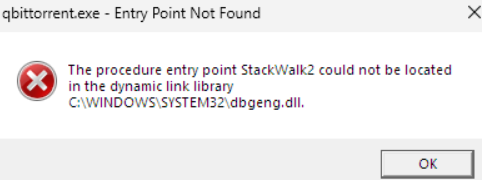
- “Entry Point Not Found: The procedure entry point ... could not be located in the dynamic link library dbghelp.dll.”
Symptoms Indicating DLL Problems
Beyond error prompts, other signs include:
- Unexpected application crashes or freezes
- Slow system performance
- Errors during software installation or updates
- Frequent system restarts or blue screens (BSOD) Prompt identification of these symptoms enables faster resolution and reduces impact on your workflow.
Effective Troubleshooting Steps to Fix dbghelp.dll Errors
Addressing dbghelp.dll errors requires a systematic approach. Below are recommended steps to diagnose and resolve the issues:
Reinstalling the DLL File
-
Locate a clean copy:
-
Download dbghelp.dll from a reputable source or extract it from a trusted Windows installation media.
-
Copy to system directory:
-
Place the file into
C:\Windows\System32\(for 64-bit systems, also considerC:\Windows\SysWOW64\). -
Register the DLL:
-
Open Command Prompt as administrator and run:
regsvr32 dbghelp.dll
Using Official Runtime Downloads
Microsoft provides official Visual C++ Redistributable Packages which include the necessary runtime components, including dbghelp.dll.
- Download the latest version compatible with your system from the Microsoft official site.
- Install or repair the redistributable package to restore system files.
Running System File Checker (SFC)
The SFC tool scans and repairs corrupted system files.
- Open Command Prompt as administrator.
-
Run:
sfc /scannow -
Wait for the process to complete, then restart your computer.
Using DISM Tool
If SFC fails to fix the problem, the Deployment Image Servicing and Management (DISM) tool can repair Windows image files.
- Run Command Prompt as administrator.
-
Execute:
DISM /Online /Cleanup-Image /RestoreHealth -
After completion, rerun
sfc /scannow.
Updating Windows and Drivers
Keeping your Windows OS up to date ensures that system files like dbghelp.dll are current and compatible.
- Go to Settings > Update & Security > Windows Update.
- Click Check for updates.
- Install all available updates and restart. Update hardware drivers—especially graphics and chipset drivers—via Device Manager or manufacturer websites for optimal performance.
Manual Repair Methods for dbghelp.dll Issues
In some cases, manual intervention is necessary:
Manual DLL Replacement
- Download a verified dbghelp.dll compatible with your Windows version.
- Backup existing file located in
C:\Windows\System32\orSysWOW64\. - Replace the corrupted/missing file with the new copy.
- Restart your PC.
Registering DLL with RegSvr32
- Open Command Prompt as administrator.
-
Enter:
regsvr32 /u dbghelp.dll (to unregister if needed) regsvr32 dbghelp.dll (to register) -
Confirm success messages.
Restoring System Files via System Restore
If recent changes caused errors, restoring to a previous restore point can revert system files to a healthy state:
- Search for System Restore in the Start menu.
- Follow prompts to select a restore point before issues arose.
- Complete the restore and reboot.
Preventing Future dbghelp.dll Errors
Prevention is better than fix. Maintain system health with proper practices:
Security Best Practices
- Use reputable antivirus and anti-malware tools.
- Perform regular scans to detect threats that might corrupt system files.
Routine Updates
- Keep Windows and all drivers current to prevent compatibility issues.
- Enable automatic updates for seamless maintenance.
Regular Virus Scans and Maintenance
- Schedule weekly virus scans.
- Run disk cleanup and defragmentation tools periodically.
Backup Strategies
- Regularly back up critical data and create system images.
- Use system restore points before installing major updates or new software.
Conclusion
dbghelp.dll is a pivotal component in Windows that enables debugging, error reporting, and system stability. Errors associated with this DLL can stem from corruption, deletion, or compatibility issues, but with a structured troubleshooting approach, most problems are solvable. Whether through reinstalling the DLL, running system repairs, or updating Windows, the key is to take methodical steps to restore system health. Maintaining proactive system management—such as applying updates, avoiding suspicious downloads, and performing regular scans—can significantly reduce the risk of encountering future dbghelp.dll errors. By following this comprehensive guide, you can resolve DLL issues efficiently and ensure your Windows environment remains stable and reliable.
Take Action Today: Keep your system healthy, and don't hesitate to seek professional support if problems persist beyond basic fixes. A well-maintained PC runs smoother, faster, and more securely!