Introduction
If you're a Windows user, encountering errors related to concrt140.dll can be frustrating, especially when they cause application crashes, startup failures, or runtime disruptions. DLL (Dynamic Link Library) files are essential components that facilitate smooth operation and interoperation of software programs. When these files are missing, corrupted, or incompatible, they can significantly impact your system stability. This comprehensive guide aims to help you understand concrt140.dll, diagnose common problems, and apply effective solutions to restore your system's optimal performance.
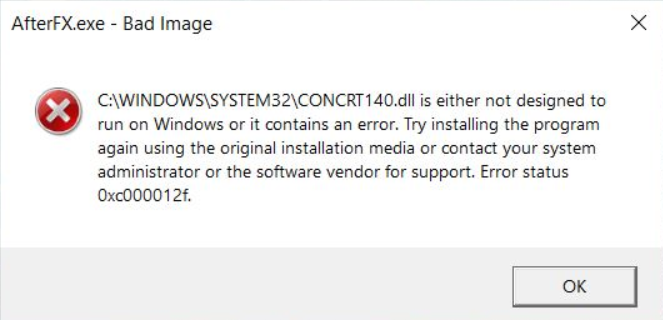
Understanding concrt140.dll and Its Role in Windows
What is concrt140.dll?
concrt140.dll is a vital Dynamic Link Library file associated with the Microsoft Visual C++ Redistributable for Visual Studio 2015 and later versions. It is part of the Concurrency Runtime, a library designed to simplify asynchronous programming and parallel execution in Windows applications. This DLL enables programs to run tasks concurrently, significantly improving performance and responsiveness, especially in resource-intensive applications like games, development tools, and modern software.
Why DLL Errors Happen
DLL errors like "concrt140.dll is missing" or "failed to load" usually occur due to:
- Corrupted DLL files: Often caused by system crashes, improper shutdowns, malware, or failed updates.
- Missing DLL files: When the DLL has been accidentally deleted or isn't installed properly.
- Incompatible or outdated software: Newer applications may require the latest runtime libraries, which are not present on your system.
- Faulty Windows updates: Installing updates improperly can disrupt DLL files.
- Malware infections: Malicious software can delete or corrupt system files, including DLLs.
Common concrt140.dll Errors and Their Symptoms
Error messages overview
Users often encounter various error messages related to concrt140.dll, such as:
- "The program can't start because concrt140.dll is missing from your computer."
- "Failed to load concrt140.dll."
- "concrt140.dll is not found."
- "This application has failed to start because the application configuration is incorrect."
Impact on applications
These errors typically prevent programs from starting correctly, lead to instability, or cause applications to crash unexpectedly. For instance:
- Gaming applications may crash during gameplay.
- Development tools relying on Visual C++ libraries might fail to launch.
- System processes might generate repeated error prompts, affecting overall usability.
Diagnosing concrt140.dll Problems
Step-by-step troubleshooting
Before attempting fixes, it's essential to identify the root cause accurately.
1. Check for missing or corrupted DLL files
-
Use System File Checker (SFC) to scan and repair corrupt system files:
bash sfc /scannow -
Run the Deployment Image Servicing and Management (DISM) tool to fix Windows corruption:
bash
  DISM /Online /Cleanup-Image /RestoreHealth
2. Verify application compatibility
- Ensure the software you're trying to run is compatible with your Windows version.
- Check for updates or patches from the software developer.
3. Inspect recent changes
- Did the error start after a Windows or application update?
- Have you recently installed or uninstalled any software that could interfere with runtime libraries?
Effective Fixes for concrt140.dll Errors
Manual replacement and registration
Step 1: Download the correct concrt140.dll from a reputable source or extract it from a trusted Visual C++ Redistributable installer.
Step 2: Place the DLL in the application's directory or in the system folder (C:\Windows\System32 or C:\Windows\SysWOW64 for 64-bit systems).
Step 3: Register the DLL:
regsvr32 concrt140.dll
Note: Ensure you run Command Prompt as Administrator.
Reinstalling Visual C++ Redistributables
Since concrt140.dll is part of the Visual C++ Redistributable packages, reinstalling these packages can resolve missing or corrupted DLL issues.
- Download the latest supported versions from the official Microsoft website.
- Install both the x86 and x64 versions, depending on your system.
Updating Windows and Drivers
Keeping your OS and device drivers updated ensures compatibility and fixes known issues:
- Run Windows Update regularly.
- Update graphics and hardware drivers from the manufacturer's website.
Preventing Future concrt140.dll Issues
System maintenance tips
- Use built-in tools like Disk Cleanup and Storage Sense to keep your system optimized.
- Schedule regular System File Checker (SFC) scans and DISM commands.
Security best practices
- Use reputable antivirus software.
- Avoid downloading DLL files from unverified sources.
- Be cautious with email attachments and downloads.
Conclusion
DLl-related errors like those involving concrt140.dll can disrupt your workflow and cause software instability. However, with a clear understanding of its role, accurate diagnosis, and methodical application of fixes—such as reinstalling the Visual C++ Redistributables, updating your system, and performing system scans—you can resolve the majority of these issues effectively. Remember, maintaining regular system updates and security practices can prevent many DLL errors in the future. If problems persist despite your efforts, consider consulting professional technical support to ensure your system’s health and stability.
Call to Action
Dealing with DLL errors can be complex, but with patience and the right solutions, you can restore your Windows system’s reliability. Don’t hesitate to seek professional help if needed, and always back up important data before making significant system changes.
JSON Structured Data
{
  "markdown_content": "## Troubleshooting concrt140.dll Errors: How to Fix Missing or Corrupted DLL Files\n\n### Introduction\n\nIf you're a Windows user, encountering errors related to `concrt140.dll` can be frustrating, especially when they cause application crashes, startup failures, or runtime disruptions. DLL (Dynamic Link Library) files are essential components that facilitate smooth operation and interoperation of software programs. When these files are missing, corrupted, or incompatible, they can significantly impact your system stability. This comprehensive guide aims to help you understand `concrt140.dll`, diagnose common problems, and apply effective solutions to restore your system's optimal performance.\n\n---\n\n## Understanding concrt140.dll and Its Role in Windows\n\n### What is concrt140.dll?\n\n`concrt140.dll` is a vital Dynamic Link Library file associated with the Microsoft Visual C++ Redistributable for Visual Studio 2015 and later versions. It is part of the **Concurrency Runtime**, a library designed to simplify asynchronous programming and parallel execution in Windows applications. This DLL enables programs to run tasks concurrently, significantly improving performance and responsiveness, especially in resource-intensive applications like games, development tools, and modern software.\n\n### Why DLL Errors Happen\n\nDLL errors like \"concrt140.dll is missing\" or \"failed to load\" usually occur due to:\n\n- **Corrupted DLL files**: Often caused by system crashes, improper shutdowns, malware, or failed updates.\n- **Missing DLL files**: When the DLL has been accidentally deleted or isn't installed properly.\n- **Incompatible or outdated software**: Newer applications may require the latest runtime libraries, which are not present on your system.\n- **Faulty Windows updates**: Installing updates improperly can disrupt DLL files.\n- **Malware infections**: Malicious software can delete or corrupt system files, including DLLs.\n\n---\n\n## Common concrt140.dll Errors and Their Symptoms\n\n### Error messages overview\n\nUsers often encounter various error messages related to `concrt140.dll`, such as:\n\n- **\"The program can't start because concrt140.dll is missing from your computer.\"**\n- **\"Failed to load concrt140.dll.\"**\n- **\"concrt140.dll is not found.\"**\n- **\"This application has failed to start because the application configuration is incorrect.\"**\n\n### Impact on applications\n\nThese errors typically prevent programs from starting correctly, lead to instability, or cause applications to crash unexpectedly. For instance:\n\n- Gaming applications may crash during gameplay.\n- Development tools relying on Visual C++ libraries might fail to launch.\n- System processes might generate repeated error prompts, affecting overall usability.\n\n---\n\n## Diagnosing concrt140.dll Problems\n\n### Step-by-step troubleshooting\n\nBefore attempting fixes, it's essential to identify the root cause accurately.\n\n#### 1. Check for missing or corrupted DLL files\n\n- Use **System File Checker (SFC)** to scan and repair corrupt system files:\n\n  ```bash\n  sfc /scannow\n  ```\n\n- Run the **Deployment Image Servicing and Management (DISM)** tool to fix Windows corruption:\n\n  ```bash\n  DISM /Online /Cleanup-Image /RestoreHealth\n  ```\n\n#### 2. Verify application compatibility\n\n- Ensure the software you're trying to run is compatible with your Windows version.\n- Check for updates or patches from the software developer.\n\n#### 3. Inspect recent changes\n\n- Did the error start after a Windows or application update?\n- Have you recently installed or uninstalled any software that could interfere with runtime libraries?\n\n---\n\n## Effective Fixes for concrt140.dll Errors\n\n### Manual replacement and registration\n\n**Step 1**: Download the correct `concrt140.dll` from a reputable source or extract it from a trusted Visual C++ Redistributable installer.\n\n**Step 2**: Place the DLL in the application's directory or in the system folder (`C:\\Windows\\System32` or `C:\\Windows\\SysWOW64` for 64-bit systems).\n\n**Step 3**: Register the DLL:\n\n```bash\nregsvr32 concrt140.dll\n```\n\n*Note*: Ensure you run Command Prompt as Administrator.\n\n### Reinstalling Visual C++ Redistributables\n\nSince `concrt140.dll` is part of the Visual C++ Redistributable packages, reinstalling these packages can resolve missing or corrupted DLL issues.\n\n- Download the latest supported versions from the [official Microsoft website](https://support.microsoft.com/en-us/help/2977003/the-latest-supported-visual-c-downloads).\n- Install both the x86 and x64 versions, depending on your system.\n\n### Updating Windows and Drivers\n\nKeeping your OS and device drivers updated ensures compatibility and fixes known issues:\n\n- Run **Windows Update** regularly.\n- Update graphics and hardware drivers from the manufacturer's website.\n\n---\n\n## Preventing Future concrt140.dll Issues\n\n### System maintenance tips\n\n- Use **built-in tools** like Disk Cleanup and Storage Sense to keep your system optimized.\n- Schedule regular **System File Checker (SFC)** scans and **DISM** commands.\n\n### Security best practices\n\n- Use reputable antivirus software.\n- Avoid downloading DLL files from unverified sources.\n- Be cautious with email attachments and downloads.\n\n---\n\n## Conclusion\n\nDLl-related errors like those involving `concrt140.dll` can disrupt your workflow and cause software instability. However, with a clear understanding of its role, accurate diagnosis, and methodical application of fixes—such as reinstalling the Visual C++ Redistributables, updating your system, and performing system scans—you can resolve the majority of these issues effectively. Remember, maintaining regular system updates and security practices can prevent many DLL errors in the future. If problems persist despite your efforts, consider consulting professional technical support to ensure your system’s health and stability.\n\n---\n\n## Call to Action\n\nDealing with DLL errors can be complex, but with patience and the right solutions, you can restore your Windows system’s reliability. Don’t hesitate to seek professional help if needed, and always back up important data before making significant system changes.\n\n---",
  "seo_structured_data": {
    "howto_enabled": false,
    "howto_steps": [],
    "total_time": "PT0M",
    "proficiency_level": "Beginner",
    "faq_enabled": true,
    "faq_items": [
      {
        "question": "What is concrt140.dll?",
        "answer": "concrt140.dll is a Dynamic Link Library file associated with the Microsoft Visual C++ Redistributable, essential for enabling concurrent programming features in Windows applications."
      },
      {
        "question": "How do I fix a missing concrt140.dll file?",
        "answer": "You can fix a missing concrt140.dll by reinstalling the Visual C++ Redistributable packages, copying the DLL from a trusted source, or repairing your Windows system files using tools like SFC and DISM."
      },
      {
        "question": "Can I manually register concrt140.dll?",
        "answer": "Yes, you can manually register the DLL using Command Prompt with administrator privileges by executing 'regsvr32 concrt140.dll' after placing the DLL in the appropriate system directory."
      }
    ]
  }
}