Introduction
For GTA V modding enthusiasts and PC gamers, encountering errors related to scripthookv.dll can be frustrating and disruptive to seamless gameplay. As a critical component in managing game mods, this DLL file enables custom scripts to run smoothly within GTA V. However, like any system or application file, scripthookv.dll is susceptible to various issues, causing errors that can render the game unplayable or unstable.
This comprehensive guide aims to equip you with a clear understanding of scripthookv.dll errors, their root causes, and practical steps to troubleshoot and resolve them effectively. Whether you're facing missing DLL notifications, crashes, or startup failures, follow these detailed instructions to restore your game’s functionality and optimize your modding experience.
Understanding scripthookv.dll and Common Error Messages
What is scripthookv.dll?
scripthookv.dll is a dynamic link library that acts as a bridge between the game engine and custom scripts created by modders for GTA V. It allows players to install mods that extend or alter the game’s behavior, such as adding new vehicles, weapons, or gameplay mechanics.
This DLL file is crucial for the operation of tools like Script Hook V, developed by Alexander Blade, which facilitate the integration of scripts into GTA V. Proper installation and compatibility of scripthookv.dll ensure a smooth modding experience, but issues arise when the file is missing, corrupted, or incompatible.
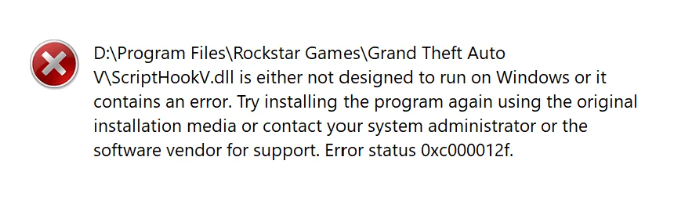
Common error messages and symptoms
Typical error messages:
- "The program can't start because scripthookv.dll is missing from your computer."
- "Failed to load scripthookv.dll"
- "Error loading scripthookv.dll"
- Crashes upon game startup
- In-game mod features not working or causing instability
Symptoms include:
- Game fails to launch or crashes immediately after launching
- Mod scripts do not execute or produce errors in the console
- Unexpected behavior or graphical glitches related to mod scripts
Understanding these messages helps in pinpointing the cause, whether it’s a missing file, version mismatch, or corruption.
Causes of scripthookv.dll Errors
DLL corruption and damage
Files can become corrupted due to improper installation, disk errors, or malware infections. A damaged scripthookv.dll may fail to load correctly, resulting in errors or crashes.
Version conflicts with game updates
GTA V frequently receives updates that may shift the compatibility landscape for modding tools. If scripthookv.dll isn't updated accordingly, it can cause conflicts or errors when launching the game.
Malware and viruses
Malicious software can corrupt or delete DLL files, including scripthookv.dll, jeopardizing both game stability and system security.
Incomplete installation or manual errors
Incorrectly copying, overwriting, or installing scripthookv.dll can lead to runtime errors or missing DLL issues.
How to Fix scripthookv.dll Errors Manually
Step 1: Confirm the issue and gather necessary files
Identify the exact error message and verify the presence of scripthookv.dll in the game's main directory, typically in *GTA V\plugins* or the game installation folder.
Step 2: Download the official scripthookv.dll file
Always download scripthookv.dll from the official source or trusted community sites like the Alexander Blade's official page. Avoid third-party sites that may host infected or modified versions.
Step 3: Use official downloads to replace DLL
- Download the latest Script Hook V package from the official site.
- Extract the archive file and locate scripthookv.dll.
- Copy this DLL file into your GTA V main folder, replacing the existing one if necessary.
Step 4: Manual replacement process
If you're replacing a corrupted DLL:
- Delete the current scripthookv.dll from your game folder.
- Paste the new, verified version in the same directory.
- Ensure that the file is not blocked by Windows (Right-click > Properties > Check "Unblock" if available).
Step 5: Registry and system file checks
- Run System File Checker (SFC) to repair missing or corrupted system files that could affect DLL loading:
- Open Command Prompt as administrator.
- Type
sfc /scannowand press Enter. -
Wait for the process to complete and follow any prompts.
-
Verify that your Windows is up to date, especially if recent system updates conflict with your game files.
Step 6: Additional troubleshooting tools
Use tools like Dependency Walker or Microsoft’s Process Monitor to analyze DLL load failures, especially if errors persist.
Preventive Measures and Best Practices
Keep game and tools updated
Regularly update GTA V, Script Hook V, and related modding tools to maintain compatibility after official game patches.
Run antivirus scans
Periodically scan your system with reputable antivirus software to detect and remove malware that might compromise DLL integrity.
Backup DLL files and game data
Create backups of your scripthookv.dll and mod files before making major updates or changes, ensuring swift recovery if issues occur.
Use trusted sources only
Download all modding tools and DLL files from official sites or well-established community forums to prevent security risks.
Make use of standard installation procedures
Follow official installation instructions carefully, avoiding manual modifications unless necessary and well-understood.
Additional Resources
Official scripthookv download sites
- Alexander Blade's official site
- Community forums such as GTA5-Mods.com for vetted tools and updates
Recommended repair tools
- Dependency Walker: For diagnosing DLL load issues
- System File Checker (SFC): To repair Windows system files
- Malwarebytes: For malware removal
Community support channels
- GTA V modding forums, Discord servers, and Reddit communities
- Official support pages for GTA V updates and troubleshooting
Conclusion
Dealing with scripthookv.dll errors can initially seem daunting, but understanding the root causes—such as DLL corruption, version mismatches, or malware—enables more effective troubleshooting. By following the step-by-step manual fixes, keeping your game and tools up to date, and practicing good security habits, you can minimize future issues and enjoy stable, enhanced GTA V gameplay.
Always prioritize downloading official or well-trusted files, and don’t hesitate to seek support from vibrant modding communities. With proper maintenance and caution, your modding experience will remain smooth, fun, and secure.
Happy gaming and modding!