Introduction
If you're a Windows user, you might have encountered mysterious error messages pointing to a file named mdnsnsp.dll. These errors often relate to Bonjour, Apple's zero-configuration networking service that’s commonly bundled with Apple devices and certain software applications. While Bonjour facilitates smooth device discovery and network sharing, issues with its DLL files—particularly mdnsnsp.dll—can cause system instability, application errors, or prevent certain software from starting correctly. Troubleshooting mdnsnsp.dll errors is important to maintain your system's performance, ensure seamless network communication, and prevent potential security vulnerabilities. In this guide, you'll learn about the role of mdnsnsp.dll and Bonjour, how to identify symptoms, and step-by-step solutions to fix DLL errors effectively.
Understanding mdnsnsp.dll and Bonjour
What is mdnsnsp.dll?
mdnsnsp.dll is a Dynamic Link Library file associated with Bonjour — a service that enables devices and applications to discover each other over a network without manual configuration. Specifically, mdnsnsp.dll handles network discovery functions related to Bonjour’s implementation of Multicast DNS (mDNS).
Role of Bonjour in Windows Environments
While Bonjour was initially developed for macOS, it’s also available for Windows, mainly supporting Apple devices like iPhones, iPads, and printers. Many applications, including iTunes and some printers, depend on Bonjour for network communication. Without proper functioning of Bonjour and its DLL files like mdnsnsp.dll, users may experience issues with device detection or network sharing.
Common DLL Errors Related to mdnsnsp.dll
Errors associated with mdnsnsp.dll usually fall into categories such as:
- Missing DLL file: "The file mdnsnsp.dll is missing"
- Failed to load DLL: "Unable to start application because mdnsnsp.dll was not found"
- Entry point not found: "The procedure entry point ... was not found in mdnsnsp.dll"
- Corrupted DLL: System crashes or application malfunctions when the DLL becomes corrupted or outdated.
Identifying Symptoms and Diagnosing the Issue
How to Recognize Signs of mdnsnsp.dll Errors
Common symptoms indicating issues with the mdnsnsp.dll file include:
- Frequent error messages during startup or while running specific applications
- Bonjour services not starting or disappearing from services list
- Network devices (printers, iOS devices) not being detected
- Application crashes related to Apple's services (like iTunes)
- System instability or slowdowns when accessing network resources
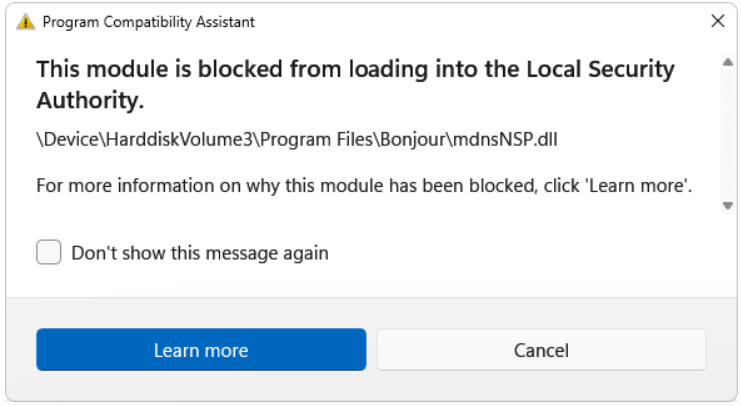
Error Messages and Codes
Pay attention to specific messages, such as:
- “The program can't start because mdnsnsp.dll is missing”
- “entry point not found: [function] in mdnsnsp.dll”
- “Unable to load mdnsnsp.dll”
When and How Errors Typically Occur
Errors often surface after:
- Updating or reinstalling Bonjour or Apple software
- Windows updates that alter DLL files
- Manual removal of Bonjour or antivirus scans that delete files
- System crashes or malware infections corrupt DLL files
Tools for Diagnosing DLL Problems
To diagnose, you can use:
- Event Viewer: Logs application and system errors
- Dependency Walker: Checks DLL dependencies
- System File Checker (SFC): Repair corrupted system files
- DISM: Repair Windows image
Manual Repair Steps for mdnsnsp.dll Errors
Reinstalling Bonjour via Official Downloads
The safest way to restore mdnsnsp.dll is through a clean reinstall of Bonjour: 1. Download the latest Bonjour installer directly from Apple’s official website. 2. Run the installer and follow on-screen prompts. 3. Restart your computer and check if the error persists.
Replacing mdnsnsp.dll Manually
If you have a clean copy of mdnsnsp.dll (e.g., from a trusted source):
1. Navigate to the installation directory:
/device/harddiskvolume3/program files/bonjour/
2. Backup any existing mdnsnsp.dll file.
3. Copy the fresh DLL into this folder.
4. If prompted, replace the existing file.
Registering DLLs Using RegSvr32
Registering DLL files ensures the system recognizes them:
1. Open Command Prompt as Administrator.
2. Enter the command: regsvr32 /u mdnsnsp.dll to unregister the current DLL.
3. Then register it again with: regsvr32 mdnsnsp.dll.
4. Restart your computer and verify the issue is resolved.
Using System File Checker (SFC) and DISM Tools
These tools help repair corrupted system files:
- SFC Scan:
- Open Command Prompt as Administrator.
- Run:
sfc /scannow - Let the process complete and follow any on-screen instructions.
- DISM Scan:
- Run:
DISM /Online /Cleanup-Image /RestoreHealth - Wait for completion, then restart your system.
Preventing Future DLL Errors
Regular System Updates
Keeping Windows and all drivers up to date minimizes compatibility issues and security vulnerabilities.
Running Virus Scans
Malware can corrupt DLL files; perform periodic full-system scans with reputable antivirus solutions.
Proper Uninstallation of Bonjour and Related Software
When removing Bonjour, always use the official uninstaller or the 'Add or Remove Programs' feature to prevent orphaned files.
System Restore and Backup Strategies
Regularly create system restore points and backups to revert any future problematic changes safely.
Conclusion
DLL errors related to mdnsnsp.dll can disrupt your network functionality and application stability. By understanding the role of Bonjour and carefully following manual repair steps—such as reinstalling Bonjour, replacing DLL files, registering DLLs, and utilizing system repair tools—you can resolve most common issues efficiently. Regular system maintenance—including updates, virus scans, and backups—can greatly reduce the likelihood of encountering similar DLL errors in the future. Remember, manual modifications to DLL files carry some risk; always back up your system beforehand and proceed cautiously. If problems persist despite troubleshooting, consider consulting IT professionals or seeking support from Apple's official resources to prevent further system instability.
Stay proactive with your system maintenance to ensure seamless device connectivity and optimal performance!