Introduction
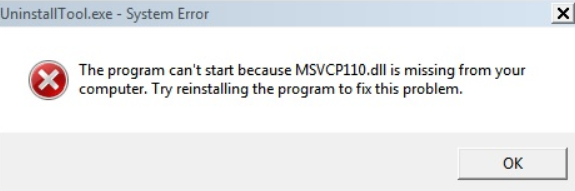
If you've encountered a disturbing error message stating that msvcp100.dll is missing, you're not alone. This common Windows issue often disrupts normal program operation, prevents games from launching, or causes runtime errors, significantly affecting user experience. Understanding and resolving this problem promptly is essential to maintain system stability and software functionality. In this comprehensive guide, we'll explore what causes the msvcp100.dll missing error and provide step-by-step solutions to fix it effectively.
Understanding the 'msvcp100.dll Missing' Error
What is msvcp100.dll?
msvcp100.dll is a dynamic link library (DLL) file that belongs to the Microsoft Visual C++ 2010 Redistributable package. It contains essential code that applications developed with Visual C++ rely on to perform various functions. When this DLL file is missing, corrupted, or incompatible, Windows cannot execute programs that depend on it, leading to runtime errors like "msvcp100.dll is missing".
Causes of DLL Missing Errors
Several factors can lead to the absence or corruption of the msvcp100.dll file:
- Incomplete or failed installation of Visual C++ Redistributable
- Accidental deletion of DLL files
- Malware or virus infections damaging system files
- System file corruption due to improper shutdowns
- Conflicts with outdated or incompatible software
- Windows registry issues Understanding these causes sets the foundation for effective troubleshooting.
Common Causes of the Error
System File Corruption
Corruption in Windows system files can result from improper shutdowns, hardware failures, or malware, often affecting DLL files like msvcp100.dll.
Software and Game Runtimes Conflicts
Conflicts between different versions of runtime libraries or multiple software installations can overwrite or corrupt the DLL files, leading to errors.
Malware and Virus Infection
Malicious programs may delete, quarantine, or corrupt DLL files to disrupt system operation or evade detection.
Effective Solutions to Fix the Error
Step 1: Reinstall the Microsoft Visual C++ Redistributable
Since msvcp100.dll belongs to the Visual C++ 2010 Redistributable, reinstalling or repairing this package often resolves missing DLL errors. Procedure: 1. Visit the Microsoft Official Download Center. 2. Download the Visual C++ 2010 Redistributable Package suitable for your system (x86 for 32-bit, x64 for 64-bit). 3. Run the installer and choose the Repair option if it's already installed. 4. After completion, restart your computer and check if the error persists.
Step 2: Manual DLL Replacement
If reinstalling the redistributable doesn't work, manually replacing the DLL may help.
Procedure:
1. Download a trusted msvcp100.dll version compatible with your system from reputable sources such as DLL-files.com.
2. Copy the DLL file.
3. Place it into the application's directory requesting the DLL, typically in C:\Windows\System32 (for 64-bit) or C:\Windows\SysWOW64 (for 32-bit).
4. Register the DLL by opening Command Prompt as administrator and typing:
regsvr32 msvcp100.dll
5. Restart your computer.
Caution: Always download DLL files from reputable sources to avoid malware infection.
Step 3: Run System File Checker (SFC) and Deployment Image Servicing and Management (DISM)
Corrupted system files can cause DLL errors. Running SFC and DISM scans can repair these issues.
Procedure:
1. Open Command Prompt as administrator.
2. Run SFC scan:
sfc /scannow
3. After completion, execute DISM to repair the Windows image:
DISM /Online /Cleanup-Image /RestoreHealth
4. Restart your PC and verify if the error is resolved.
Step 4: Use System Restore and Recovery Options
If the error appeared after recent changes, restoring your system to an earlier point can help. Procedure: 1. Search for "System Restore" in the Start menu. 2. Follow the wizard to select a restore point before the error occurred. 3. Proceed with the restoration process. 4. Reboot and check if the issue is fixed.
Using Official Resources and Advanced Tips
Official Runtime Downloads
Always download the Microsoft Visual C++ Redistributable packages directly from Microsoft's official site. This ensures file authenticity and compatibility.
Updating Drivers and Software
Outdated device drivers or applications can conflict with system files. Use Device Manager or third-party software to update drivers regularly.
Security Precautions
Run comprehensive antivirus scans using trusted software to detect and remove malware that may tamper with DLL files. Ensure your Windows Defender or other security tools are up to date.
Conclusion
The msvcp100.dll missing error can be a frustrating obstacle, but with systematic troubleshooting, it's quite manageable. Reinstalling Visual C++ redistributables, manually replacing DLL files, repairing system files, and avoiding malware are effective approaches to resolving this issue. Regular system maintenance, timely updates, and cautious downloads significantly reduce the risk of DLL errors reappearing. If these solutions do not resolve the problem, consider consulting a professional technician to diagnose potential underlying hardware or software issues. Maintaining a healthy Windows system ensures smooth software operations, optimal gaming performance, and overall digital productivity.
Take action now: follow the outlined steps, keep your system updated, and enjoy a hassle-free computing experience!